Your customers stop ordering. You find out three months later.
Downline Autopilot reads your own organization from myOffice — the official Detailed Genealogy report, exported by you, from your own account — and keeps it up to date in a CRM that is only yours.
It shows you who stopped ordering and how long ago, then writes to them on your behalf: in their own language, in the morning of their own time zone, with an offer that expires.
And it deliberately leaves part of your audience out of every campaign, so at the end you know how many of those reorders happened because of you — and how many would have happened anyway.
14 days free, no credit card. Launch your first automation and the trial extends to 28 days.
How it works
Four steps. The screenshots are the product as it is today, not a mock-up.
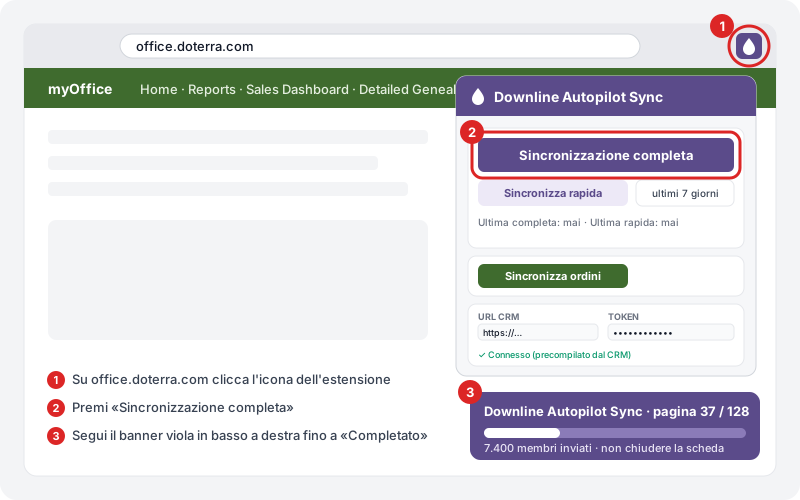
Connect your myOffice
You install a Chrome extension and sign in to myOffice the way you always do. The extension runs the official genealogy report for you and sends it to your CRM. It never sees or stores your myOffice password, and it only ever reads your own organization.
See where the leak is
Everyone lands in a grid: by member type, by country, and by how long they have been silent — 21–60 days, 61–120, 121–365, over a year. Each cell also shows how many of those people you can still reach by email. That grid is your reorder problem, quantified with your own people.
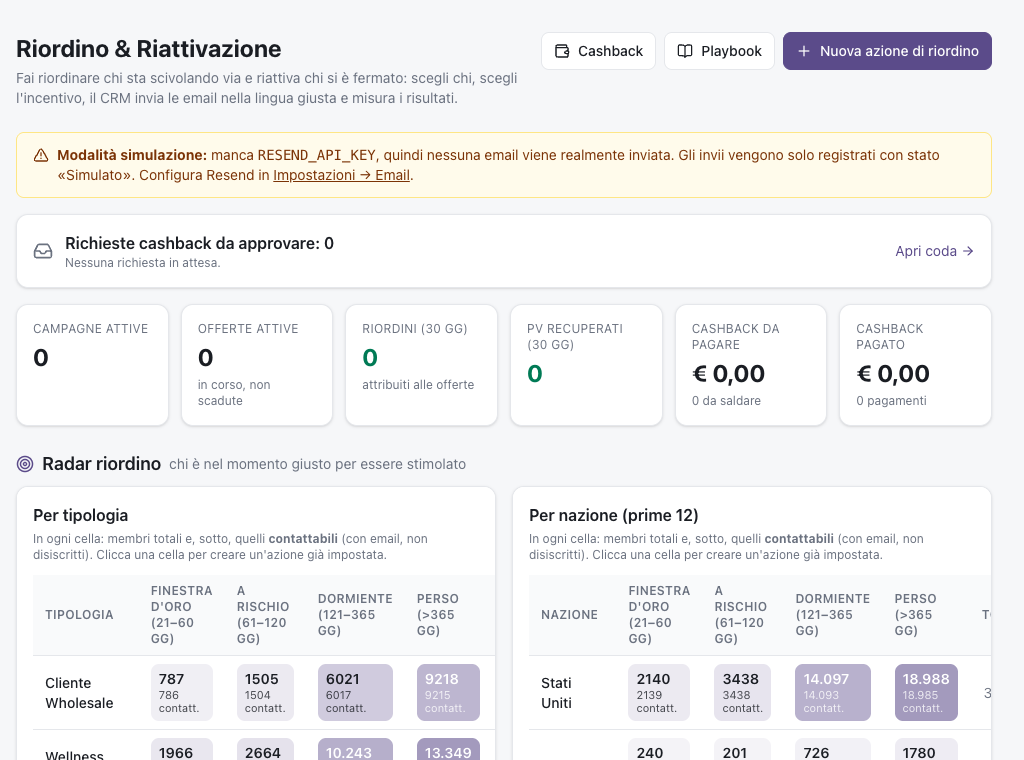
Real capture from the app, with real numbers. The interface runs in English and Italian; these captures happen to be in Italian.
Pick who, pick the offer, launch
Three screens: who receives it, what they get, confirm. The CRM writes the emails in each person's language, spreads them over the days so your sender warms up instead of burning, and sends inside the 9–13 window of each recipient's own time zone. You start with the short-cycle automation — the people whose product is running out right now — because that one gives you an answer in days, not in a month.
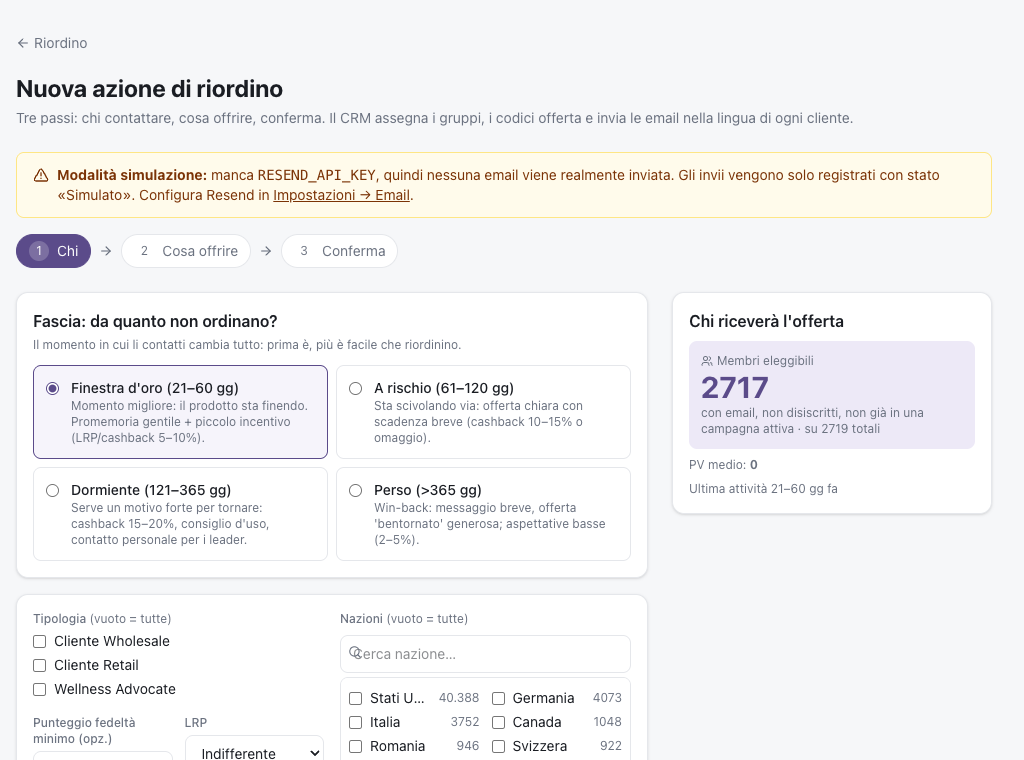
Real capture from the app. The count on the right updates as you change the audience.
Find out whether it worked
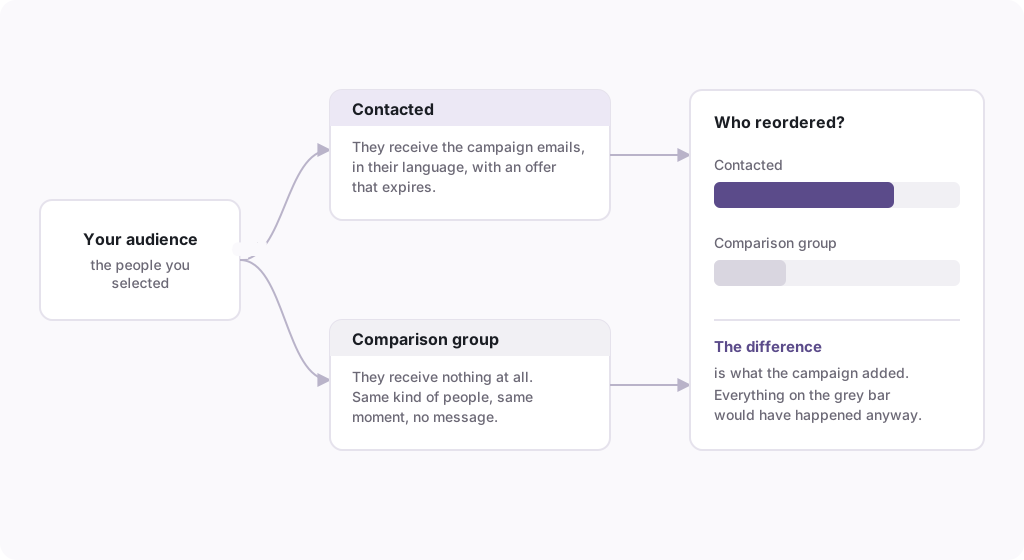
Before anything goes out, a slice of the audience is set aside at random and receives nothing. At the end you compare: how many of the people you contacted ordered, against how many of the people you did not contact ordered. The difference is what the campaign added. Everything else would have happened anyway — and without that comparison group you would never know which was which.
If the campaigns do not beat the comparison group, you get your money back.
Sixty days from your first payment. If the people you contacted did not reorder more than the people you deliberately left out, write to us and we refund what you paid — no argument, no forms. We can hold that promise because the product measures it for you, on your own screen, and you can read the number before we do.
The only condition is the one that makes it measurable: leave the comparison group on. It is on by default.
The five things you are probably thinking
Written out in full, because they are the right questions.
«This is against the rules. They will shut my account down.»
It is the first thing to settle, so here is what the tool does not do. It does not scrape doTERRA: the genealogy report is the official one and you run the export yourself, from your own account. It never stores your myOffice credentials. It only ever touches your own downline — there is no way to reach crossline or sideline, because those people are not in your report. It does not email anyone outside your organization. It is not an income opportunity, there is nothing to earn by passing it on, and it carries no doTERRA branding. It is a piece of software you rent, the way you rent a mailbox or a design tool. Read the Terms before you sign up: they say the same thing in binding language.
«My data ends up with you, or with my upline.»
Every account is a separate, isolated workspace. The isolation is enforced at the database layer and fails closed: a query without an account context does not return other people's rows, it errors. Your upline cannot see your account even if they invited you, and we do not read your lists to build anything of our own. You can export everything you put in, and you can delete the account and its data. The Privacy Policy names what we store and for how long.
«The emails will land in spam and I will burn my domain.»
This is the risk we spent the most engineering on, because it is real. New senders start on a warm-up plan: a small daily volume that grows over weeks instead of one blast on day one. Bounce and complaint rates are watched, and sending pauses automatically when they cross the thresholds instead of pushing through. Every email carries a one-click unsubscribe and a physical postal address, as the law requires. Sending happens in the 9–13 window of the recipient's own time zone, not yours. If you want your own sending domain, the CRM walks you through SPF and DKIM and verifies the records before it lets you use it.
«I don't have the time, and I'm not technical.»
The setup is one genuinely fiddly step — loading a Chrome extension — and four easy ones. The app walks you through them one at a time, tells you how long each takes, and, for the two places where people actually get stuck, tells you exactly what went wrong and how to fix it yourself. If you stop halfway, you get an email that picks up where you left off. After the setup, the recurring work is a sync and a look at the numbers.
«The cashback comes out of my own pocket. What does it actually cost me?»
It costs you only on orders that actually happened. Cashback is a percentage of the order's PV, it is owed only after the person has ordered, and it is paid from your own account — the CRM never holds or moves your money, it only tells you who is owed what and can trigger the transfer if you connect a payout provider. You set the percentage, you set a minimum order, and you can run campaigns with no incentive at all: the reminder on its own is a valid strategy, and the comparison group will tell you whether the incentive was worth paying for.
About the trial
14 days, no credit card. There is a reason it is not shorter: a reorder campaign needs about a week and a half before the orders it caused start showing up. So when you launch your first automation, the trial extends itself to 28 days — automatically, without asking. A trial that ends before the product can show you a result is not a trial.
Plans
The plan follows the size of your organization. After your first sync the CRM tells you which one you need — you do not have to guess now.
- Up to 2,500 synced members
- 5,000 emails / month
- 1 user
- Segments, templates, campaigns, flows, reorder
- Cashback + payouts from the CRM
- Up to 15,000 synced members
- 30,000 emails / month
- 3 users
- Segments, templates, campaigns, flows, reorder
- Cashback + payouts from the CRM
- Your own sender domain
- Unlimited members
- 100,000 emails / month
- 10 users
- Segments, templates, campaigns, flows, reorder
- Cashback + payouts from the CRM
- Your own sender domain
- API & webhooks
- AI copy included
- Priority support
- Unlimited members
- Custom email volume
- Unlimited users
- Segments, templates, campaigns, flows, reorder
- Cashback + payouts from the CRM
- Your own sender domain
- API & webhooks
- AI copy included
- Priority support
Cashback and payouts are in every plan, including Starter. A plan that cannot pay an incentive cannot prove it worked.
Beyond the monthly quota sending pauses until the next month or an upgrade — no surprise charges.
Questions people actually ask
Do I need a credit card to try it?
No. You sign up, you use it, and nothing is charged. If you do not subscribe at the end, sending stops and your data stays there until you delete it.
Do you need my myOffice password?
No, and there is nowhere to type it. You sign in to myOffice yourself, in your own browser, and the extension reads the report from the page you are already looking at.
What languages do the emails go out in?
Six: English, Italian, German, Spanish, Romanian and French. Each person gets the language recorded for them, not the language you happen to work in.
Why is the Chrome extension not in the Web Store yet?
It is on its way. Until it is listed you install it as an unpacked extension, which means turning on Chrome's developer mode once. It is three minutes and the app walks you through it, but we would rather tell you now than let you discover it at step four.
What happens if I go over the monthly email quota?
Sending pauses until the next month or until you move up a plan. Nothing is charged automatically and there is no overage bill.
Can I send from my own domain?
Yes, from Pro upwards. The CRM gives you the DNS records and checks them; until they verify, you send from the shared platform domain with your own display name.
Can I invite people from my team?
Yes: one seat on Starter, three on Pro, ten on Business. Extra seats share the same account and the same data.
What happens to my data if I leave?
You export it and you delete the account. We do not keep a copy to sell you back later, and we do not use one account's lists for another.
Is this affiliated with doTERRA?
No. Downline Autopilot is an independent tool built for doTERRA Wellness Advocates. It is not affiliated with, sponsored by or endorsed by dōTERRA, and it carries none of their branding.
Who built it
It was built by a doTERRA leader for his own organization, across several countries and languages, and it ran there before it was ever sold to anybody. That is a fact about where it comes from, not a promise about what it will do for you — the only promise on this page is the guarantee above.
Try it on your own list
The honest test is not a demo. It is your own organization, your own numbers, and a first campaign with a comparison group. That takes about twenty minutes of setup and a week and a half of waiting.
Start the free trialBy signing up you accept: Terms of Service·Privacy Policy